Selected outcomesIndependent product
True Contrast
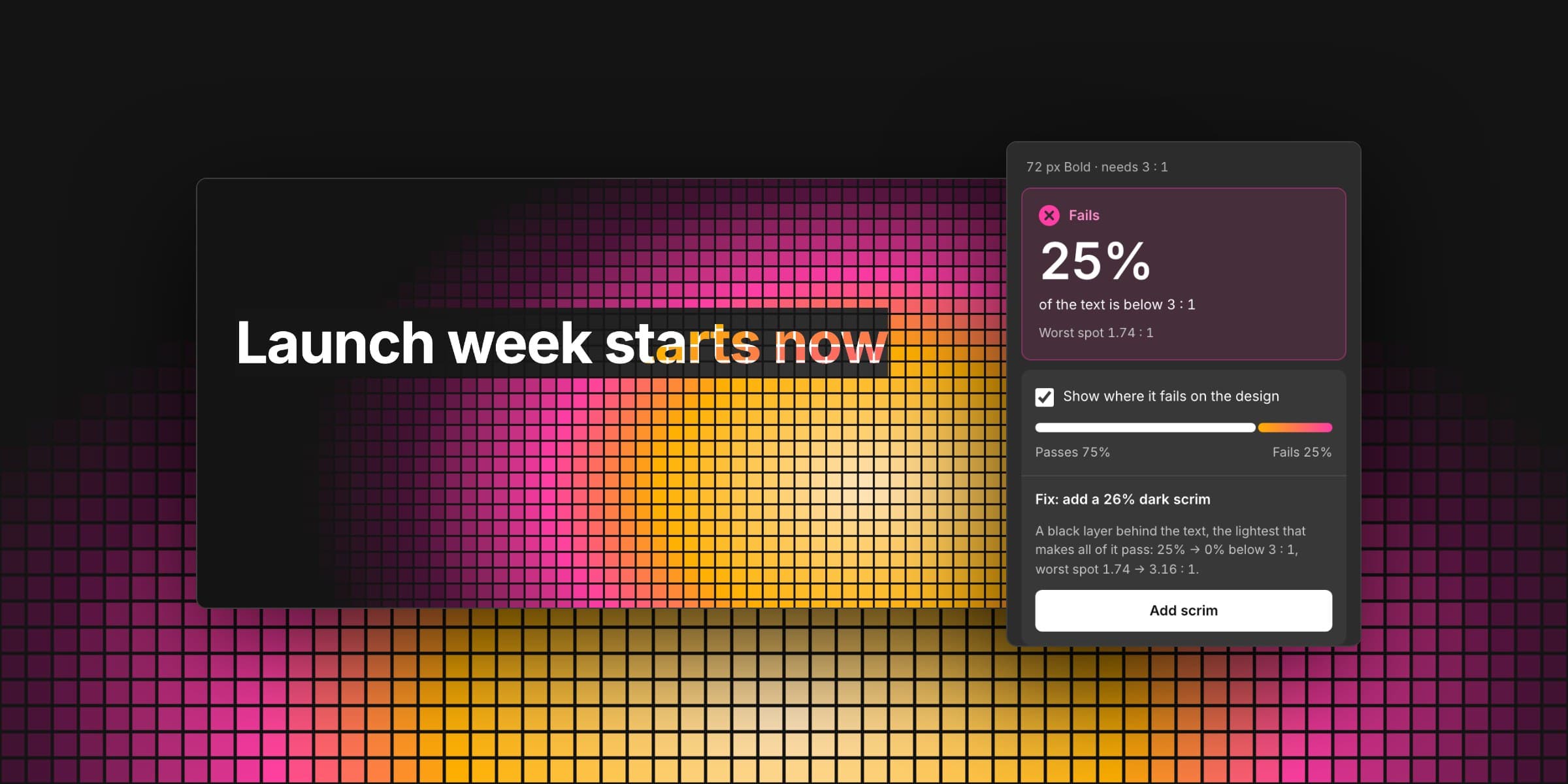
A Figma plugin that checks text contrast against every pixel behind it, not one sampled color.
- Role
- Product, interaction and visual design, brand and engineering, built with an AI coding agent
- Timeline
- Concept to Figma Community submission, 2026
- Stack
- TypeScript, Figma Plugin API, Vitest, Playwright, esbuild
Quick read
Problem
Contrast checkers compare two flat colors. Text over a photo or gradient gets checked against one sampled spot, so the bright patch behind half a word goes unnoticed.
Role
I designed and built it end to end: the measuring engine, the Figma plugin, its brand and an audit of 119 sites, directing an AI coding agent through the build.
Intervention
A plugin that measures text against every pixel behind it, shows where it fails as a heatmap on the design, and adds the lightest scrim that makes all of it pass.
Result
A working plugin, submitted to Figma Community. Its audit found 6 of 23 headlines over images fail, and every one passes a one-color check.
Working plugin, submitted to Figma Community
A heatmap on the design and a one-click fix, plus an audit of 119 home pages run on the same engine.
- Headlines over images that fail
- 6 of 23
- Of those, passed a one-color check
- All 6
- Figma Community installs
- To be measured
Deep dive
Where it started1 of 9
Where it started
Building this site, I set links over a moving glow. A contrast checker wants two colors, and there weren't two: the light changed behind every letter. When I measured every pixel instead, one layout came out at 1.0 : 1 at its worst, with 27% of the link text under 4.5 : 1.
Designers set text over photos, gradients and glass all the time, and the decision is made in Figma. I wanted the honest check to live there.
One color can't describe an image
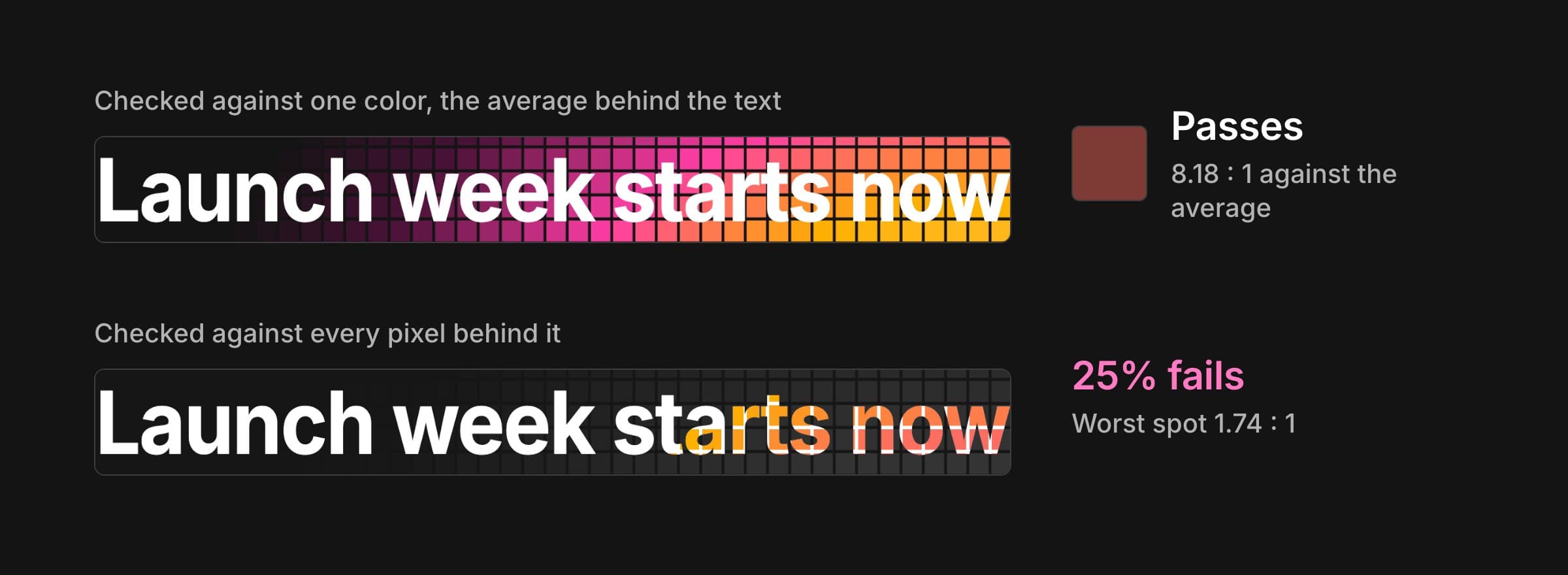
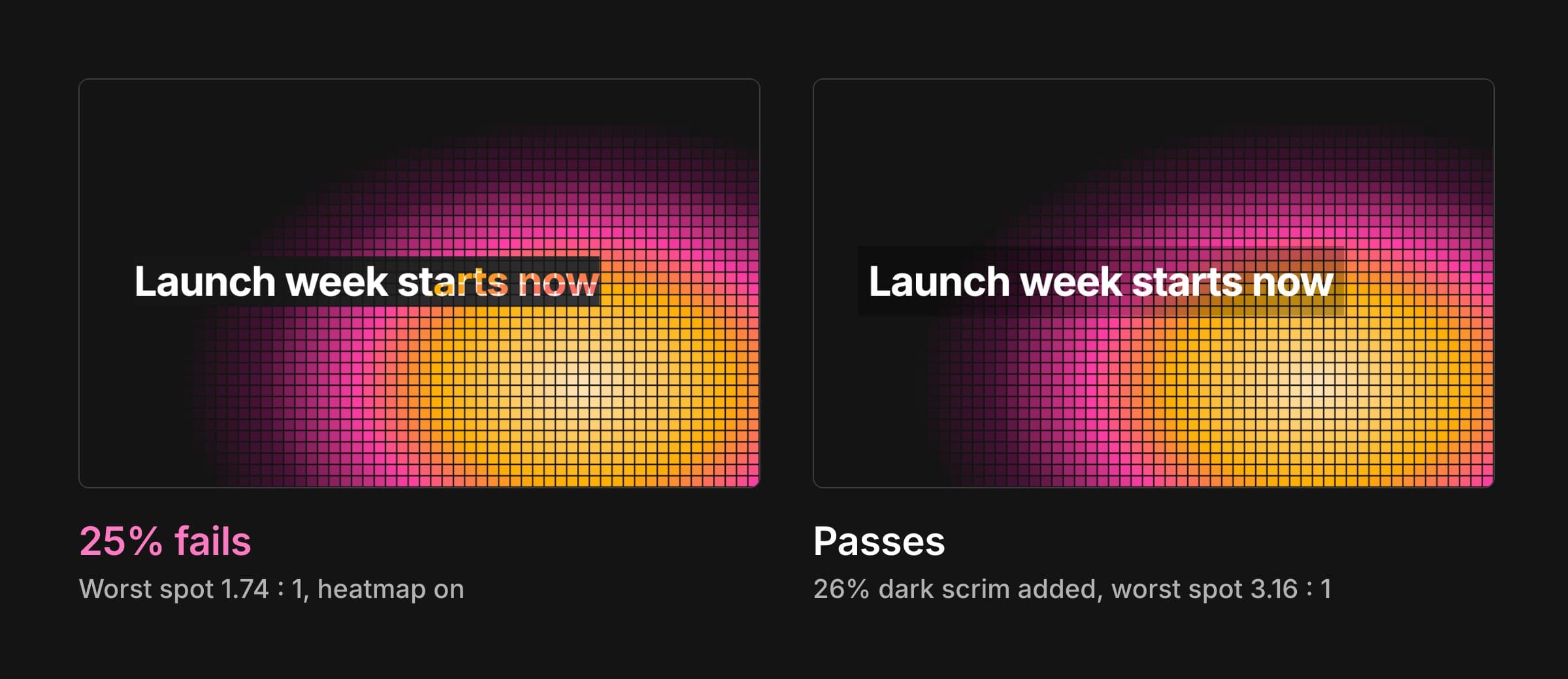
Most checkers ask for a text color and a background color, so for text over an image you pick a spot or eyeball it. The average of a busy background can pass comfortably while the brightest part behind the letters fails. Here, the same headline passes at 8.18 : 1 against its average color, while a quarter of the text falls below the 3 : 1 that large text needs.
- Measure every pixel of the text against what's really behind it, using the WCAG AA minimum for its size.
- Show where it fails on the design itself, not as a number to interpret.
- Fix it in one click, with the lightest change that makes all of it pass.
- Never move or recolor anything the designer made.
How often it happens
Before building more, I wanted to know whether this was common or a corner case. I ran the plugin's engine over the hero headlines of 119 well-known home pages, in a headless browser, checking each one against every pixel and against its average color.
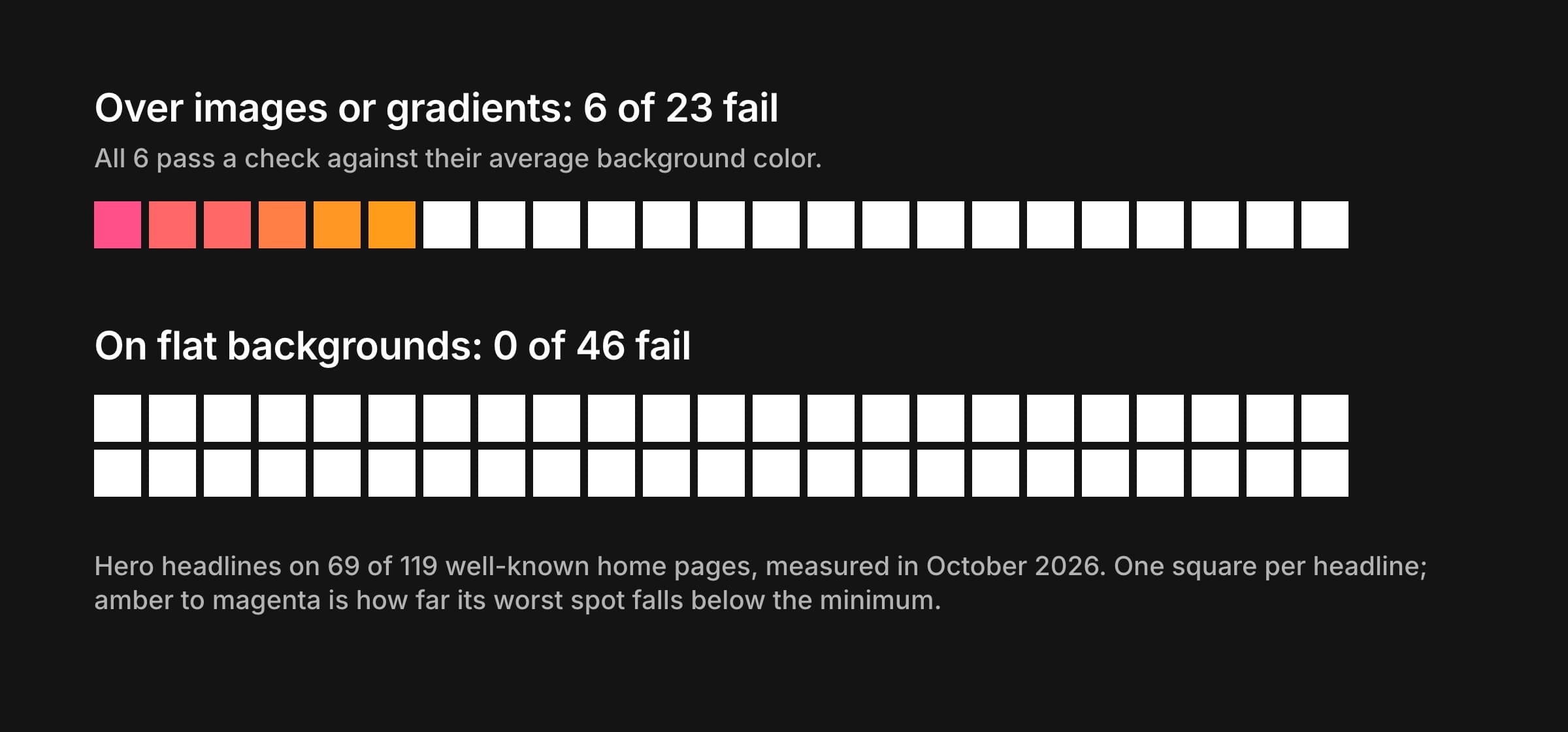
- On flat backgrounds, 46 headlines, and none fail. The usual check is right there.
- Over images or gradients, 6 of 23 fail somewhere, and all 6 pass against their average color.
- In the failing headlines, typically 7.9% of the text dips under the minimum, with a median worst spot of 1.95 : 1. A dark scrim of about 20% fixes them.
The numbers are small, and I say so in the method: 33 sites refused automated visits, and they lean toward retail and travel brands that often set text over photography. I ran the audit twice; 45 of the 46 headlines measured both times got the same verdict, and the one difference, a live stock ticker, led to a stability check that now excludes anything that moves.
Answer, show, fix
The panel answers three questions in order: is this text OK, where does it fail, and how do I fix it. Over seven design rounds the layout settled on a tinted result card with one large number, a pass/fail bar that doubles as the heatmap's key, and the fix with its before-and-after numbers, so a designer knows what a click will do before making it.
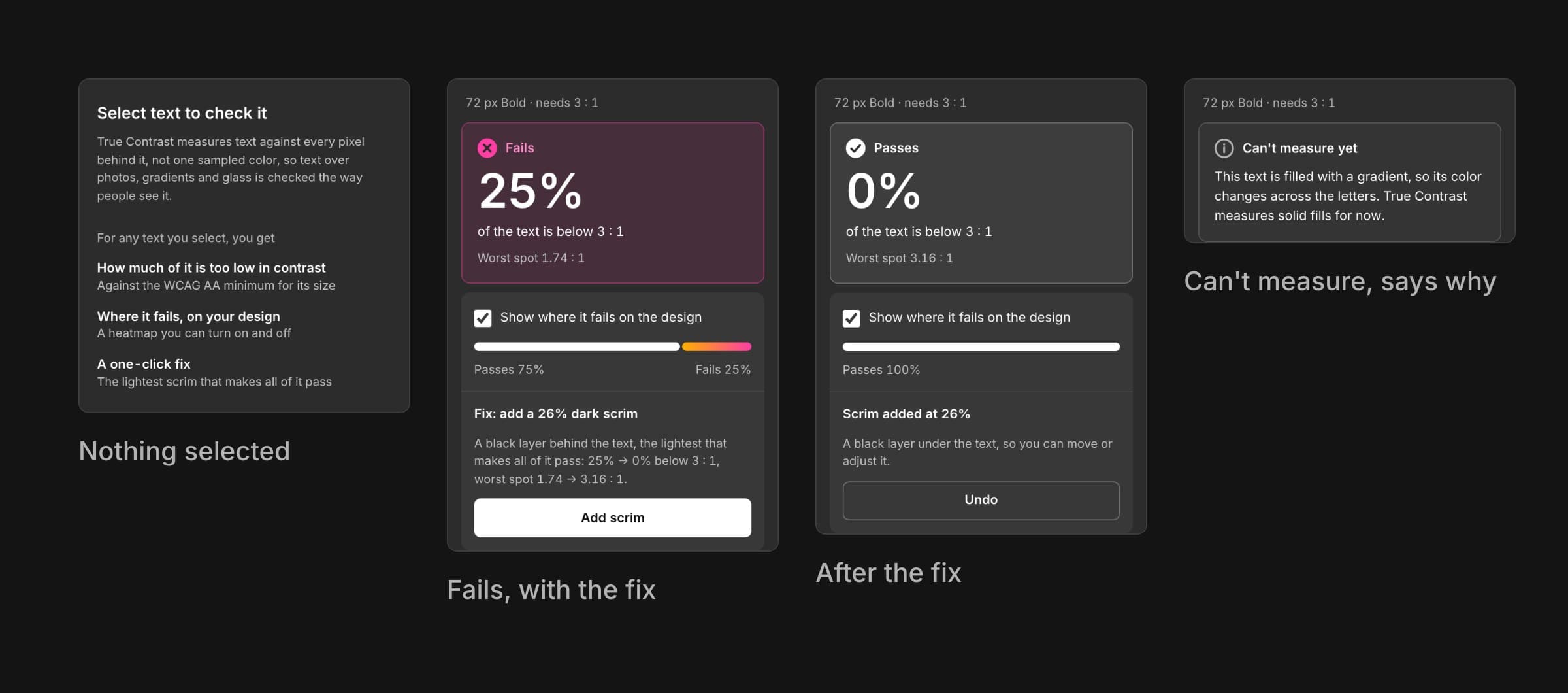
The fix is a scrim: a dark or light layer placed right under the text, in the same frame. It's the lightest one that makes every pixel pass, and the plugin measures again once it's in place, so “fixed” is a measurement, not a promise.
Considered and rejected
Fixing until most of the text passes
My first fix target was the 5th percentile, which let through text that was mostly fine with one bad spot. A fix should make all of it pass, so it targets the worst point.
Guessing at gradient text
A gradient fill changes color across the letters, which the measurement doesn't model yet. The panel says so plainly instead of showing a confident wrong number.
A heatmap anyone can read
A heatmap drawn over a photo competes with the photo. I tested three color scales on real designs, each simulated for the two most common kinds of color blindness. Warm scales vanished into warm images, and under protanopia the ember scale turned the same olive as the background.
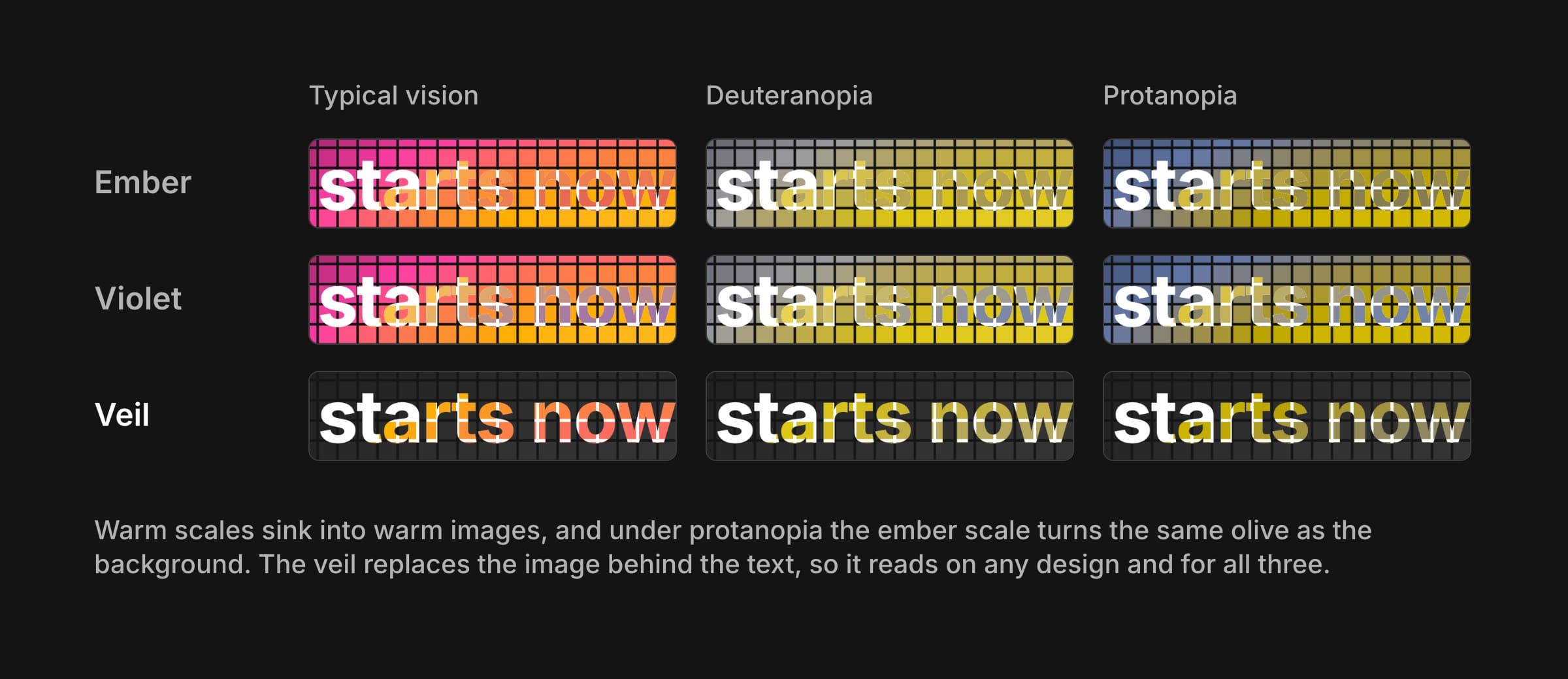
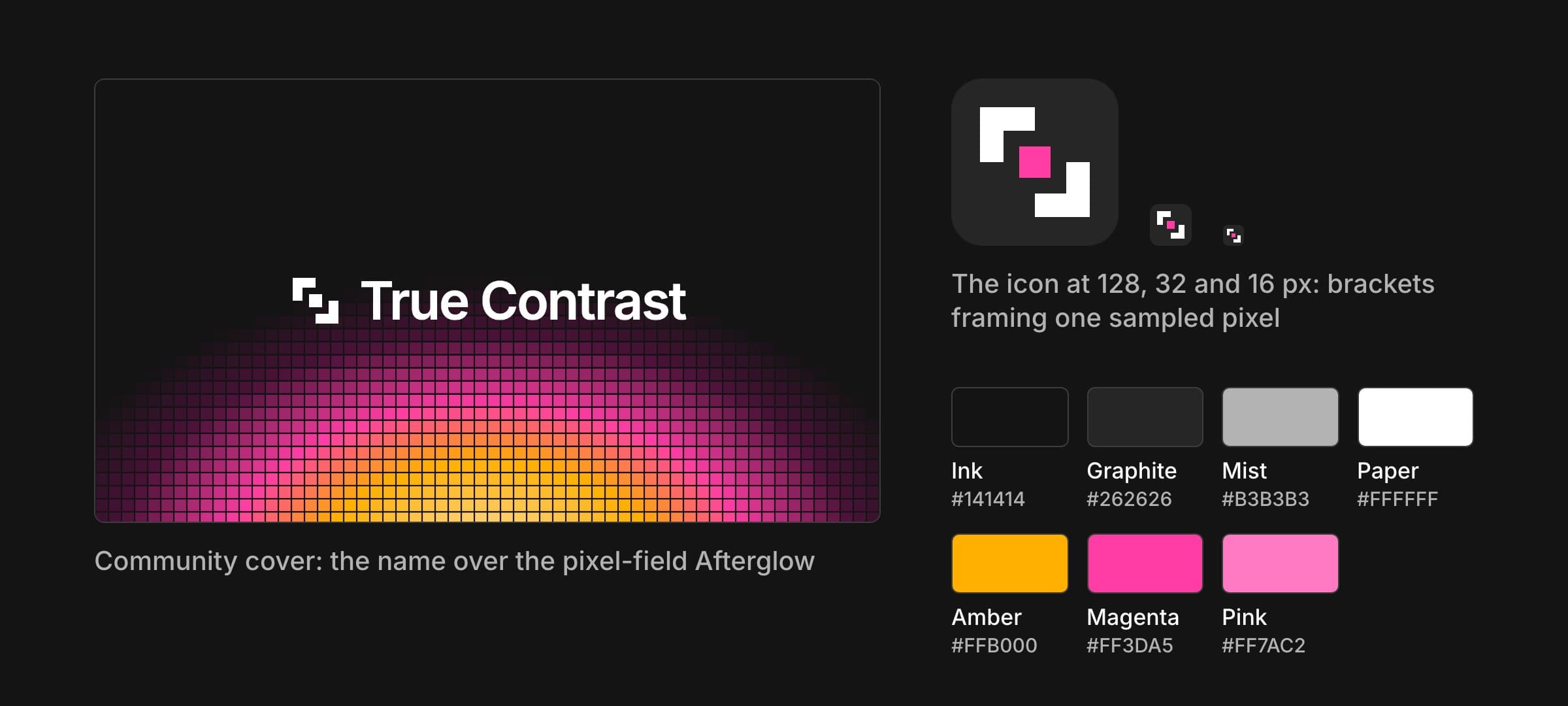
The veil replaces the image inside the text's box with a dark grey, so it reads on any design: passing letters are white, failing ones run amber to magenta, deeper where it's worse. Those colors became the brand. Magenta is the accent, Pink exists because magenta measured 4.30 : 1 on Figma's panel grey, and the icon frames a single sampled pixel.
Measuring without moving anything
One measuring engine, written in TypeScript and shared by the plugin and the audit, so their numbers can't drift apart. It works out how much of each pixel the text covers, measures that pixel against what's behind it, and returns the failing share, the worst spot, the heatmap and the fix.
Getting a clean picture of what's behind the text was the hard part. My first build exported a copy of the text and hid the original for the background. In an auto-layout frame both move things: a hidden layer gives up its space and its neighbors slide into view, so real designs came back as 0% or 100%. The plugin now sets the text's opacity to 0 for the one export, which keeps its space, and reads the coverage from the text layer exported on its own.
const png = { format: "PNG", constraint: { type: "SCALE", value: scale } } as const;

// Coverage: the text layer on its own. Its alpha is coverage times its opacity.
const mask = await node.exportAsync(png);

// What's behind: everything in that spot, with the text at opacity 0.
// Hiding it would collapse its space in auto layout and move its neighbors.
node.opacity = 0;
slice = figma.createSlice();
slice.x = bounds.x;
slice.y = bounds.y;
slice.resize(bounds.width, bounds.height);
const background = await slice.exportAsync(png);
// …and in `finally`: slice.remove(); node.opacity = wasOpacity;- Heatmap layers are tagged and swept on every measure, page change and close, because Figma's undo can bring a removed layer back.
- A suggested scrim leaves a little headroom over the minimum, so it still passes after Figma's rendering rounds it.
- See-through text is measured as it appears, blended with what's behind each pixel.
- No network access: nothing about a design leaves Figma.
Working with AI
I built True Contrast with Claude Code as my engineering pair. I set the direction and made every design call; it wrote and tested much of the code and rendered each design round with real output from the engine, so I was always judging true numbers rather than invented ones. Round after round of panels, icons and covers went that way, and I picked, mixed or redrew between each.
What AI couldn't do was use the plugin. Testing it in Figma myself turned up the auto-layout bug, heatmap layers that undo resurrected, and a “<1%” that appeared right after a fix. Each one changed how the plugin works.
Testing
- 21 unit tests for the engine, including known WCAG pairs, see-through text, coverage and the fix target.
- The built panel driven in a browser with real exports, the same way Figma feeds it, for every state.
- Hands-on testing in Figma on real files, including auto layout and undo.
- The audit run twice, with every failure checked by eye against its heatmap.
Outcome and next steps
True Contrast works in Figma and is submitted to Figma Community. Its audit gave the case its clearest finding: every failing headline in the sample would have passed the usual check. Installs and usage will go here once the listing has been public for a few weeks.
Next, I'd compare the engine against careful manual sampling on ten designs to publish its accuracy, then add gradient-filled text and a text layer's own shadow, the two cases it reports rather than measures today.
The lesson I'll keep: an accessibility tool earns trust by being exact and by being honest about what it can't measure. The panel saying “Can't measure yet” matters as much as the heatmap.